
FWB HUD — Installation
Dependencies
| Resource | Required | Notes |
|---|---|---|
| Framework | Optional | es_extended, qb-core or qbx_core. Without one the HUD runs in Standalone mode (no nitro or harness item). |
pma-voice | Optional | Voice range and radio indicator. |
Install Steps
- Create a category folder named
[fs]inside your server'sresources/directory if you haven't already (resources/[fs]/). - Place the
fwb_hudfolder intoresources/[fs]/fwb_hud. - Remove or stop any other HUD resource (qb-hud, qbx_hud, ps-hud, esx_hud…) so two HUDs don't draw at once.
- Add the resource to your
server.cfgafter your framework:
ensure es_extended   # or qb-core / qbx_core
ensure fwb_hud- Do the steps for your framework in Framework Setup below, and add the items if you want nitro or the harness (Items).
- Restart your server.
Framework Setup
QBCore and Qbox come with their own seatbelt and cruise control. FWB HUD has them too, so you need to pick one of each. If both run, players get two seatbelt keys and two crash-ejection systems, and both cruise controls sit on the same Y key.
ESX / Standalone
Nothing to do. There is no other seatbelt or cruise control, so FWB HUD's are used.
Option 1 — Turn off FWB HUD's (easiest, no files to edit)
Good if you are happy with the framework's seatbelt and its harness item.
In game, run
/fwb_hudand open Features.On the Seatbelt tab, switch the toggle at the top right to Off.
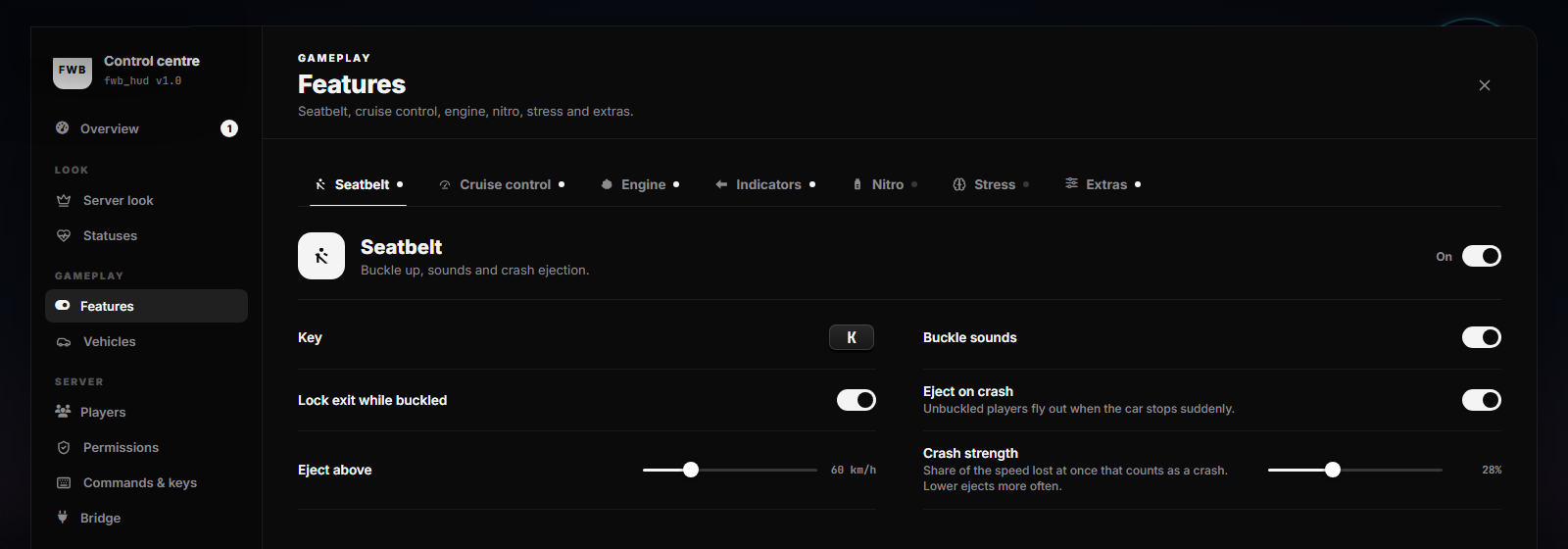
On the Cruise control tab, switch it Off too.
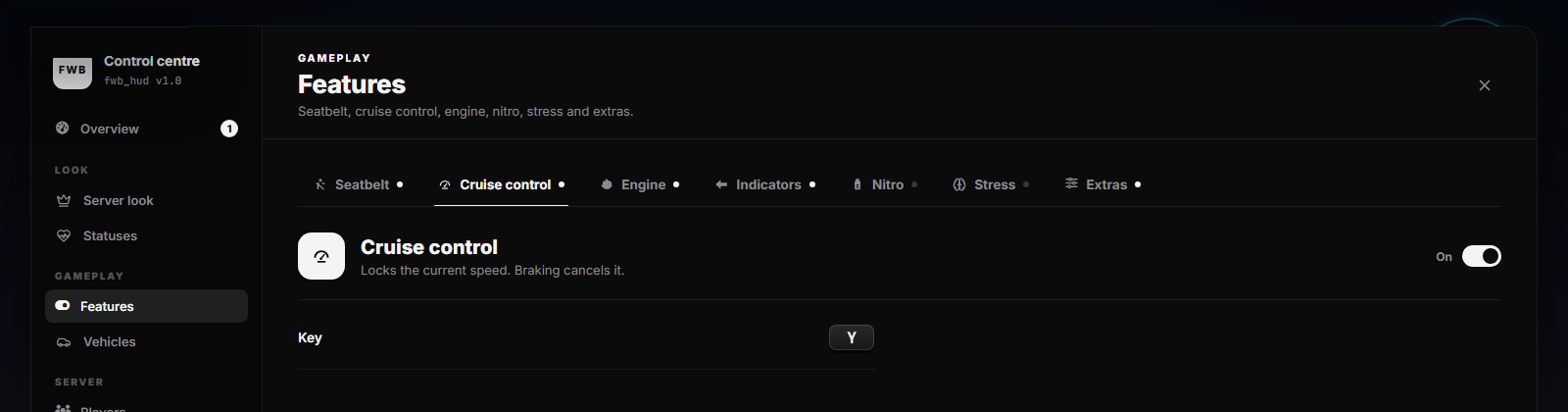
It saves straight away, and no restart is needed. The seatbelt and cruise icons on the HUD keep working: they follow qb-smallresources, qbx_seatbelt and qbx_cruise automatically.
Option 2 — Turn off the framework's
Do the steps for your framework, restart the server, and leave FWB HUD's Seatbelt and Cruise control On (they are on by default). The framework's harness item stops working with this option. FWB HUD has its own optional harness instead: switch it on in /fwb_hud → Features → Seatbelt → Racing harness (item name harness by default).
QBCore
| What | File | Change |
|---|---|---|
| Seatbelt | qb-smallresources/client/seatbelt.lua | Rename it to seatbelt.lua.disabled (or delete it) |
| Cruise control | qb-smallresources/client/cruise.lua | Rename it to cruise.lua.disabled (or delete it) |
| Radial menu | qb-radialmenu/client/main.lua | Edit one line (below) |
Why the radial menu? When a player switches seats, qb-radialmenu asks the seatbelt file whether they wear a racing harness. With that file gone, the call errors. Search for HasHarness and point it at FWB HUD instead (it answers false while nobody is strapped into an FWB HUD harness):
-- before
local HasHarnass = exports['qb-smallresources']:HasHarness()
-- after
local HasHarnass = exports.fwb_hud:HasHarness()
Qbox
| What | File / folder | Change |
|---|---|---|
| Seatbelt | resources/[qbx]/qbx_seatbelt | Delete the folder, or move it out of [qbx] (ensure [qbx] starts everything inside) |
| Cruise control | qbx_smallresources/qbx_cruise/client.lua | Rename it to client.lua.disabled |
| Other HUD | resources/[qbx]/qbx_hud | Delete or move it, or two HUDs draw at once |
| Radial menu | fwb_hud/fxmanifest.lua | Uncomment provide 'qbx_seatbelt' (below). No radial menu edit needed |
Why the radial menu? When a player switches seats, qbx_radialmenu calls exports.qbx_seatbelt:HasHarness(). With qbx_seatbelt gone, that call would error. Let FWB HUD stand in for qbx_seatbelt: open fwb_hud/fxmanifest.lua and remove the -- in front of this line:
provide 'qbx_seatbelt' -- Qbox's seatbelt (qbx_radialmenu asks it about the harness)Now every exports.qbx_seatbelt:HasHarness() is answered by FWB HUD: true while strapped into an FWB HUD harness, otherwise false. See Stand In for the Stock HUD for the other lines.
Prefer not to touch fxmanifest? Edit the radial menu instead: in qbx_radialmenu/client/main.lua, search for HasHarness and change the line:
-- before
local hasHarness = exports.qbx_seatbelt:HasHarness()
-- after
local hasHarness = exports.fwb_hud:HasHarness()
Not sure it worked?
/fwb_hud → Overview shows a warning while FWB HUD's seatbelt and the framework's seatbelt are both on. Once one of them is off, the warning goes away.
Stand In for the Stock HUD
Some scripts list qb-hud, qbx_hud or qbx_seatbelt as a dependency, or call their exports. Once you have removed that resource, FWB HUD can take its name: those scripts then start normally and their export calls reach FWB HUD, which answers the same way.
Open fwb_hud/fxmanifest.lua and remove the -- in front of the lines for the resources you removed:
-- provide 'qb-hud'        -- QBCore's HUD
-- provide 'qbx_hud'       -- Qbox's HUD
-- provide 'ps-hud'        -- Project Sloth HUD
-- provide 'qbx_seatbelt' -- Qbox's seatbelt (qbx_radialmenu asks it about the harness)| Line | What it answers |
|---|---|
provide 'qbx_seatbelt' | exports.qbx_seatbelt:HasHarness() returns FWB HUD's harness state. The seatbelt / harness player state bags are set too. |
provide 'qb-hud' / 'qbx_hud' / 'ps-hud' | Scripts with dependency 'qb-hud' (etc.) start. The stock HUD events (hud:client:UpdateNeeds, hud:client:UpdateStress, hud:client:ShowAccounts, hud:server:GainStress…) already work without it. |
Only for removed resources
Never uncomment a line while that resource is still on the server: two resources cannot have the same name, so one of them fails to start.
qb-smallresources
qb-smallresources cannot be replaced this way, because it also runs many other small scripts. On QBCore, use the one-line radial menu edit from Framework Setup.
Items (Nitro & Racing Harness)
Both items are optional and off by default. Switch them on in game:
- Nitro: /fwb_hud → Features → Nitro, toggle at the top right. Item name
nitrous. - Racing harness: /fwb_hud → Features → Seatbelt → Racing harness. Item name
harness. It needs FWB HUD's own seatbelt on, so on QBCore / Qbox do Option 2 in Framework Setup first.
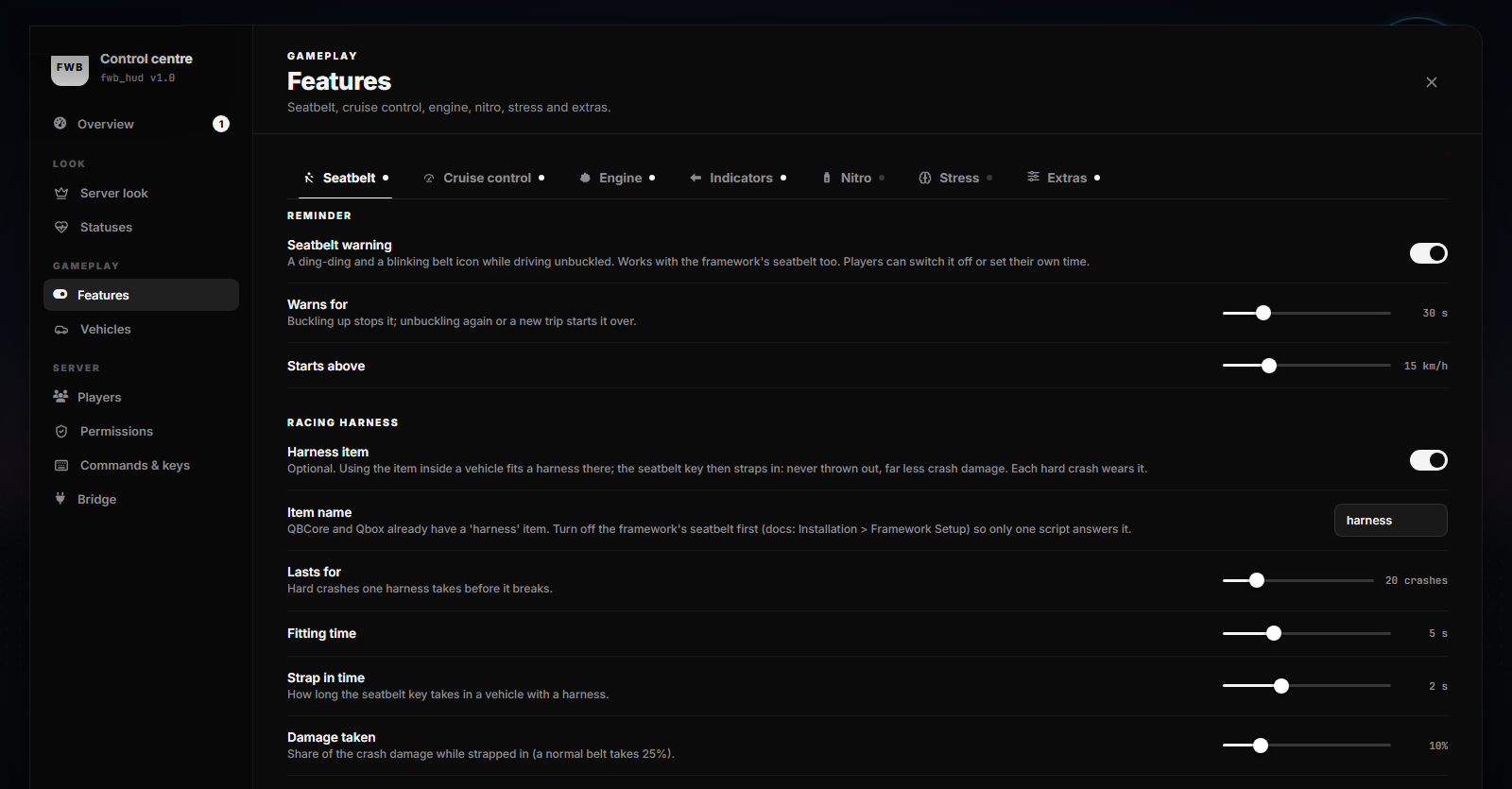
The item names can be changed on the same pages. The item has to exist in your inventory:
QBCore
Nothing to add: qb-core/shared/items.lua already has nitrous and harness.
Qbox (ox_inventory)
Nothing to add: ox_inventory/data/items.lua already has nitrous and harness.
ESX (ox_inventory)
Add both to ox_inventory/data/items.lua:
['nitrous'] = {
    label = 'Nitrous',
    weight = 1000,
    stack = true,
    close = true,
},
['harness'] = {
    label = 'Racing Harness',
    weight = 1000,
    stack = true,
    close = true,
},
ESX (default inventory)
Run this on your database:
INSERT INTO `items` (`name`, `label`, `weight`) VALUES
    ('nitrous', 'Nitrous', 1),
    ('harness', 'Racing Harness', 1);
How players use them
| Item | Use it | Then |
|---|---|---|
nitrous | Standing next to a car (not inside) | Hold Left Shift while driving to boost |
harness | Sitting inside the car | Press the seatbelt key (K) to strap in or out |
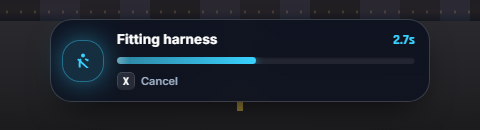
Both show FWB HUD's progress bar while fitting. Players can press X to cancel, and a cancelled fitting keeps the item.
Harness wear
A harness lasts a set number of hard crashes (default 20). When it breaks, everyone in the car gets a message and it works as a normal seatbelt. Using another harness item fits a new one.
Admin Access
The fwb_hud.admin ACE is the only admin check. Without it, typing /fwb_hud in game shows a screen with your own server.cfg line (license filled in) and a copy button.
# Give it to an admin group:
add_ace group.admin fwb_hud.admin allow

# Or to a single player:
add_ace identifier.license:xxxxxxxxxxxxxxxxxxxxxxxxxxxxxxxxxxxxxxxx fwb_hud.admin allow
Add the line, restart the server, then run /fwb_hud to open the control centre.
Where Settings Are Saved
Everything is stored in FiveM's server KVP — no SQL, no JSON files. Each player's HUD follows them by their license: identifier.